
Perplexity Exporter - Threads to Markdown
Export any Perplexity thread to Markdown, HTML, JSON or PDF, or copy it for Notion. One click, saved locally.
- Works on
- Chrome
- Version
- 3.0.3
A long Perplexity thread is fine until you want it in your notes, and selecting the whole page by hand gives you a mess. An Export button sits in the bottom-right of the thread and turns the questions and answers into a file or a clean clipboard paste.
Perplexity keeps your research in threads, but there's no clean way to get one out. This adds a one-click Export button to perplexity.ai that saves the whole thread — questions and answers — as a real file, or copies it for Notion / Obsidian.
Open any Perplexity thread, click Export, and choose:
Multi-format and actively maintained. It reads the thread already on screen — no account linking, no sign-in, nothing uploaded.
Independent extension, not affiliated with Perplexity.
Screenshots
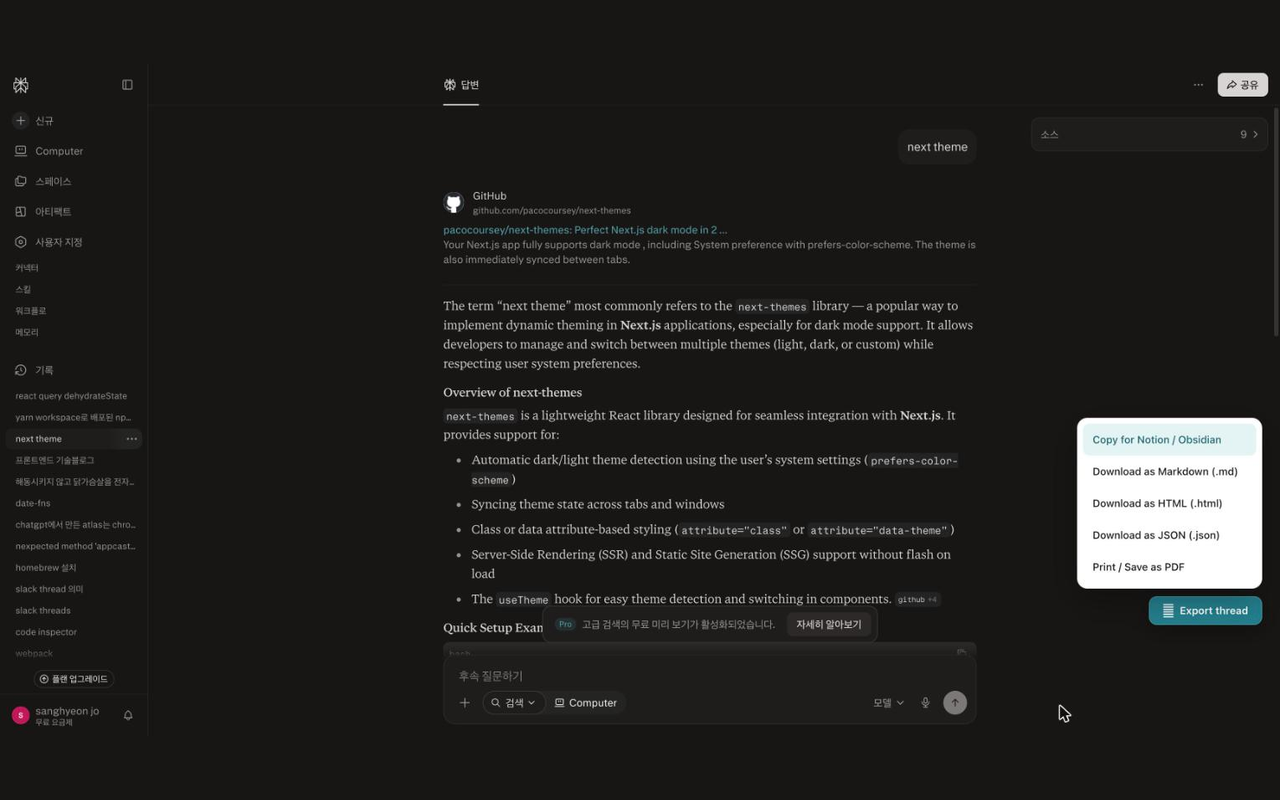
What it does
Copy for Notion / Obsidian
the full thread as clean Markdown on your clipboard.
Download as Markdown (.md)
the same transcript as a file.
Download as HTML (.html)
a self-contained, styled version.
Download as JSON (.json)
structured turns for scripts and backups.
Print / Save as PDF
a formatted, printable view.
Export the full question/answer thread as Markdown, HTML, JSON, or PDF.
"Copy for Notion / Obsidian" in one click.
Keeps every question and answer in order.
Files named from the thread, with a timestamp.
Runs entirely in your browser
no login, no servers, no tracking.
When you'd reach for it
Moving research into Notion or Obsidian
Pick Copy for Notion / Obsidian and the whole thread lands on your clipboard as Markdown, with an H1 for the thread title and each turn under a Question or Answer heading. Paste it straight into a page and the turns keep their order. A toast confirms the copy so you know it went through before switching apps.
Keeping a dated record of a search
Download as Markdown or HTML and the file is named from the thread title plus a date-and-time stamp, saved to your Downloads folder without a Save As dialog. Same-name files are uniquified rather than overwritten. The HTML version is self-contained with its styling inline, so it opens correctly years later without any assets.
Feeding threads into a script
The JSON export gives you a title, the source URL, an ISO timestamp and a messages array where each entry is a role of user or assistant plus its text. That is a workable input for a summariser, a diffing script or a backup routine. Print / Save as PDF opens a formatted print view in a new tab for anything that needs a document instead.
How to use it
- 01Open a thread on perplexity.ai.
- 02Click the "Export thread" button at the bottom-right.
- 03Pick a format, or copy it straight into your notes.
Permissions & privacy
Single purpose
Single purpose: Export the Perplexity thread currently open in the browser tab to a file (Markdown, HTML, JSON, PDF) or the clipboard. Permission — downloads: Used only to save the exported thread into the user's Downloads folder via chrome.downloads. Permission — storage: Used only to remember the user's last chosen export format locally (chrome.storage). Host permissions — https://www.perplexity.ai/*, https://perplexity.ai/*: The content script must read the thread DOM on perplexity.ai to build the export. Scope limited to Perplexity only; no <all_urls>. Remote code: None. All code is bundled; nothing is fetched or eval'd at runtime. Data collection / transmission: None. All processing is local; output goes only to the user's Downloads folder or clipboard.
Runs entirely in your browser. It reads only the text of the Perplexity thread you have open and writes to your Downloads folder or clipboard. Nothing is stored and no data is sent to any server. It runs only the code shipped inside the package — no remote code is fetched.
Questions people ask
How do I export a Perplexity thread to Markdown?
Open the thread on perplexity.ai and click Export thread at the bottom-right, then choose Download as Markdown (.md). The file collects every question and answer in page order under a title heading and goes to your Downloads folder. If you would rather paste than save, the first menu item copies the same Markdown to your clipboard.
Does the export keep links, citations and code formatting?
It captures the text as rendered on the page, so inline links and citation targets are not reconstructed as URLs and code blocks arrive as plain text. What you do get is reliable structure: the thread title, then every turn in order under a Question or Answer heading. The JSON export carries the same text with the roles kept separate.
What permissions does it need to save files?
One: downloads. The content script builds the file inside the page and hands the finished text to the service worker, which writes it with chrome.downloads as a UTF-8 data URL, so no host access beyond perplexity.ai is declared. The content script runs only on https://www.perplexity.ai/* and https://perplexity.ai/*.
The Export button did nothing, or the PDF never opened
Two different causes. If a toast says no thread was found, the page had no readable question and answer blocks yet, which happens on the home screen or before an answer finishes rendering; open a finished thread and try again. For PDF, the print view opens in a new tab, so a popup blocker on perplexity.ai will stop it and you will see a prompt to allow popups.
Can I export threads in bulk from my library?
No, it works one open thread at a time. The button reads whatever thread is currently on screen, so exporting several means opening each and clicking through. There is no library-wide operation: each export covers the one thread that is open.
Related extensions
 GitHub 한국어 (GitHub Korean)3K+ users
Turns GitHub's menus, buttons and settings labels into Korean as the page loads. Dev terms stay in the form you actually say, plus release and status alerts.
 KoreaDropdown800+ users
A Chrome extension that automatically selects 'Korea' in dropdown menus on websites.
 Naver Blog & Cafe Image Downloader9 users
Save every image from Naver Blog, Cafe, and Post in one click. Full-resolution originals in one folder, no context menu needed.
 Happy Pet - Virtual Pet7 users
A cute virtual pet companion for your new tab page
 Review Signal for Coupang — Review Trust Analyzer2 users
Trust signals for Coupang reviews: sponsored ratio, date bursts, duplicate text, rating skew. Suspicion signals, not a verdict.
 Auto Refresh - Reload Tab on Timer
Automatically reload the current tab on a timer, from 30 seconds to any interval. No ads, no tracking, no site permissions.