
Link Preview
Hover over any link to instantly preview the page title, description, and thumbnail. No clicks needed.
- Works on
- Edge
- Version
- 3.0.2
Half the tabs you open get closed two seconds later: wrong article, paywall, or nothing like what the link text promised. Hold your cursor on a link for a moment and the title, description and thumbnail come to you instead.
Link Preview lets you hover over any link to instantly see the page title, description, and thumbnail — without clicking or leaving the current page.
No sign-ups, no settings, no extra clicks — just hover and preview.
Screenshots
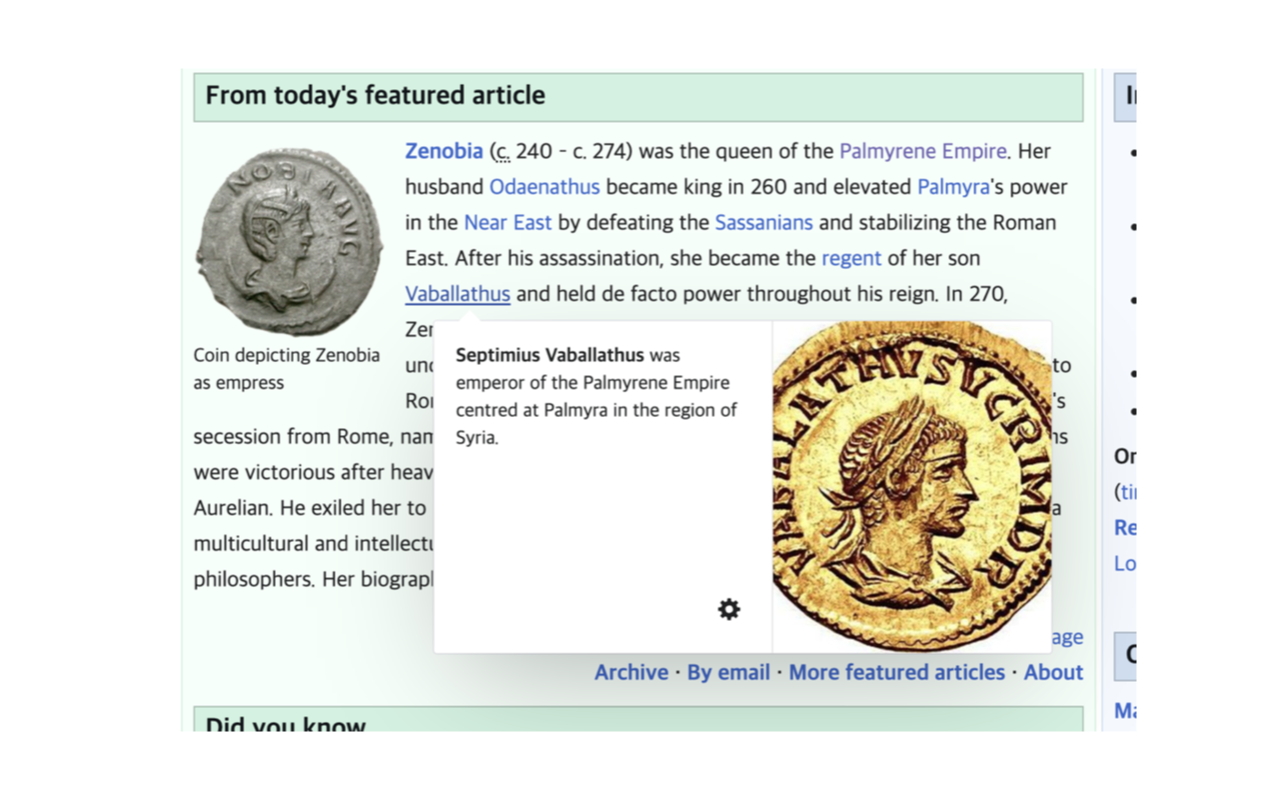
What it does
Instant link preview on hover
see title, description, and thumbnail at a glance
Open Graph metadata extraction
pulls og:title, og:description, og:image for rich previews
Favicon display
shows the linked site's icon for quick recognition
Smart positioning
preview popup stays visible, never goes off-screen
Built-in caching
previously hovered links load instantly
Lightweight
fetches only minimal data, no full page loads
Researchers scanning articles before opening them
Students checking sources without losing their place
Social media users previewing shared links
Anyone browsing link-heavy pages like Reddit, Hacker News, or Wikipedia
Professionals vetting URLs before clicking
Anyone who wants to browse faster and smarter
When you'd reach for it
Reading a link-heavy feed
On Hacker News, Reddit or a Wikipedia reference list, the link text rarely tells you what's behind it. Hovering brings up the target page's title, its first two lines of description and its thumbnail. You decide which three of thirty links are worth a tab.
Checking a shortened or unfamiliar URL
A bare t.co or bit.ly link says nothing about its destination. The card shows the title and description of the page that link actually resolves to, so you learn what it is before committing a click. The domain line still shows the shortener, so read the title rather than the domain.
Chasing sources without losing your place
When you are halfway through a long article, opening a citation means either a new tab to clean up later or losing your scroll position. Hovering keeps you where you are. The card follows the link, flipping above it when you're near the bottom of the window.
How to use it
- 01Install Link Preview — it works immediately, no setup needed
- 02Hover over any link on any webpage
- 03See the preview popup with title, description, and thumbnail
- 04Move your cursor away to dismiss the preview
Permissions & privacy
Single purpose
Link Preview has a single purpose: showing a preview popup when users hover over hyperlinks. When a user hovers over any link on any webpage, the extension fetches the linked page's Open Graph metadata (title, description, and thumbnail image) and displays it in a small popup near the cursor. The preview disappears when the cursor moves away. All fetching and rendering happens locally in the browser. No data is sent to any external server.
All processing happens locally in your browser No data is sent to any server No analytics, no tracking, no accounts Minimal permissions: storage (caches previews so repeat hovers load instantly) and webNavigation (keeps previews accurate on single-page sites) Hover. Preview. Decide. No clicks wasted. It runs only the code shipped inside the package — no remote code is fetched.
Questions people ask
How do I preview a link in Chrome without opening it?
Hold the cursor over the link for about a third of a second and a preview card appears next to it. It shows the linked site's favicon and domain, the page title, a two-line description and a thumbnail when the page provides one. Move the cursor away and the card disappears; move it onto the card and the card stays.
Which links does it work on?
Any normal link on any http or https page — there is no site list to configure and nothing to switch on. It deliberately ignores mailto:, tel:, javascript: and same-page anchor links, since there is no page to preview. If a link points at a PDF or an image rather than an HTML page, the card shows only the domain.
Why is a preview blank or missing a title?
The card is built from the target page's own metadata: og:title or the title tag, og:description or the meta description, and og:image. Pages that need a login, block requests from other origins, or take more than five seconds to answer come back empty. Only the first 50KB of HTML is read, so metadata placed unusually far down the document can be missed.
What permissions does it need, and who sees the links I hover?
The manifest declares storage and host access to all sites, and content scripts run on every http and https page — that access is what lets hover detection work anywhere. Two honest details: fetching a preview means your browser requests that page directly, so the site can see the request in its logs; and the small site icon on the card is loaded from Google's public favicon service, which receives the link's domain.
Does it slow down pages or fetch every link at once?
It only fetches a page when you actually hover a link, and only after a short delay, so passing the cursor over a list of links doesn't trigger anything. Each result is kept in memory for the rest of the session, up to a couple hundred links, so hovering the same link again is instant. Each fetch reads at most the first 50KB and gives up after five seconds.
Related extensions
 Eye Rest Reminder78 users
Reminds you to rest your eyes and prevent digital eye strain with gentle break reminders.
 Quick Memo74 users
A simple and elegant memo extension for your browser
 YouTube Detox47 users
Removes recommended videos from YouTube homepage and video pages.
 Focus Guard3 users
Block distracting sites with "Why are you here?" prompt. Reduce YouTube, X, Reddit, Instagram use — digital detox, 100% local.
 Notion Table & Database to CSV / Markdown2 users
Notion table to Markdown or CSV in one click. Adds a Copy button above any Notion table or database view. No login, no API.
 Air Quality Monitor
Real-time air quality monitor for Korean cities (PM2.5/PM10)